Build Your Own CodeRabbit With branchdiff auto - Unattended AI PR Review, On Your Terms
You are three weeks into a CodeRabbit trial. It is fine. It leaves comments on every PR within a couple of minutes of opening, mostly reasonable, occasionally wrong in a way that is hard to argue with because you cannot see what prompt it used or what model produced the verdict. Someone on the team already muted it in Slack. The bill for next quarter is sitting in your inbox, scaled by seat count, and nobody can tell you which model is actually doing the reviewing or whether it changed last month.
Meanwhile a genuinely useful part of the pitch is real: PRs get looked at the moment they have something new to look at, without a human remembering to kick off a review. That part is worth keeping. The black box, the per-seat pricing, and the “trust us, it’s calibrated correctly” auto-approve behavior are not.
branchdiff auto is the same outcome — reviews land on your open PRs automatically, day or night — built from parts you already control: your own AI CLI, your own machine, your own rules for what “approved” means. This post walks through what it actually does, mechanically, so “self-hosted CodeRabbit” is not a marketing line but something you can point at in a terminal.
What auto actually watches
branchdiff auto lists your open pull requests across GitHub and Bitbucket, works out which ones have new commits since branchdiff last reviewed them, and runs your AI reviewer against just those. Not every open PR every time — only the ones that moved.
cd ~/work/api
branchdiff auto
Fetching remote refs...
[1] github #142 fix/refund-double-charge → main — new commits
[2] github #139 feat/webhook-retry-queue → main — never reviewed
Review which? (numbers comma-separated, 'a'=all, 'q'=quit) aOnly PRs that actually need a fresh look show up here — one already reviewed at its current commit is counted and skipped silently, never printed as a row you have to scroll past. A force-push counts as movement too: the PR is re-reviewed at its new head, even when the push rewrote history rather than adding to it.
Two filters keep the candidate list relevant instead of running against everything in the repo: --source <branch> and --dest <branch> narrow by branch name, so a nightly job for release PRs only can target --dest main and ignore feature-branch noise. --watch <minutes> turns the one-shot scan into a loop — check every N minutes, review whatever changed, sleep, repeat — which is the difference between “a script I remember to run” and “a bot that is just running.”
branchdiff auto --dest main --watch 30There’s also a shortcut for the common case of just wanting a session started and reviewed right now: --review on branchdiff <branch1> <branch2> (or a PR URL) runs a full review pass immediately after the session is ready, instead of needing a separate review run afterward — and it carries every review-pass flag this post covers, --push, --approve/--request-changes, --stack, all of it.
Reviewing one PR of a stack without losing the others’ context
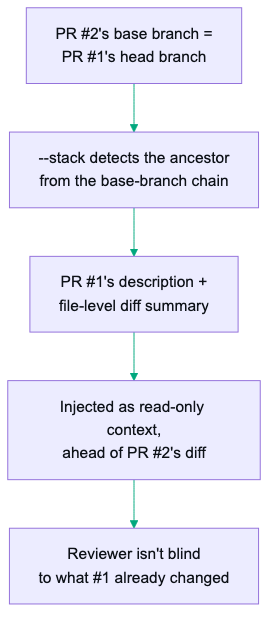
Stacked PRs are their own trust problem — PR #2 builds on PR #1’s branch, and a reviewer skimming just the diff against PR #2’s base has no idea what PR #1 already introduced underneath it. --stack, available on review context, review run, and auto itself, fixes that without you doing anything special: when a PR’s base branch is itself another open PR’s head branch, branchdiff walks the base-branch chain your forge’s PR data already carries, finds that immediate ancestor, and injects its description plus a file-level diff summary as a clearly labeled, read-only context block ahead of the diff actually under review.
branchdiff auto --dest main --stack --review --pushThe AI reads that block as context, not as something to comment on, and reviews PR #2 knowing what PR #1 already changed instead of flagging decisions that were already reviewed one PR down. And because auto already fetched the full PR list during its scan phase, --stack matches ancestors against that in-memory list instead of making a fresh lookup per PR — reviewing a ten-PR stack costs one scan, not ten.
Bring your own model
This is the part a SaaS bot cannot offer you: --tool claude|opencode|codex|gemini|cursor|llm|antigravity picks a known CLI to drive the review, and --exec "<command>" runs anything at all that reads a prompt on stdin and prints review JSON. If your team standardizes on Codex this quarter and switches to something else next quarter, that is a flag change, not a vendor renegotiation.
branchdiff auto --tool claude
branchdiff auto --tool gemini --watch 60
branchdiff auto --tool antigravity
branchdiff auto --exec "my-internal-review-wrapper --model=finetuned-v3"
What the AI is told to do is equally yours to shape. The default is a context-plus-JSON pipe — branchdiff hands the diff over and parses structured comments back. --skill switches to driving an actual review skill instead, where the AI follows instructions directly and posts its own comments through branchdiff agent commands — the built-in skill needs nothing installed. --skill-name <name> points at a custom skill you already installed with branchdiff skill add, and --additional-skill <name> (repeatable) folds a specialized skill’s guidance — a security-focused one, say — into the same pass. --prompt "<text>" adds one-off instructions on top of either mode.
| Flag | What it changes |
|---|---|
--tool claude / opencode / codex / gemini / cursor / llm / antigravity | Which known CLI drives the review |
--exec "<command>" | Any command that reads a prompt on stdin, prints review JSON |
--skill | Built-in skill, AI posts comments itself, nothing to install |
--skill-name <name> | A custom skill you installed via branchdiff skill add |
--additional-skill <name> | Layer a second skill’s guidance onto the same pass (repeatable) |
--prompt "<text>" | One-off extra instructions, either mode |
Every tracked pass now reports what it cost: each one prints a Tokens: N (~$C) line when it finishes, and branchdiff stats rolls those up into running totals, split by tool and by repo — so “what does it cost to review every PR I have open, every day” stops being a guess and becomes a number you can pull up.
If the built-in skill’s judgment doesn’t match your team’s bar — too strict on style, too loose on security, whatever — don’t fight it, generate your own with branchdiff skill add: --type review|resolve|all picks which skill(s) to write, --target (comma-separated: Claude Code, opencode, and other compatible runtimes) or --dir <path> picks where, --name <prefix> sets the filename prefix, and --force overwrites a file branchdiff didn’t generate itself. Edit the generated file’s instructions to taste, then point --skill-name at it.
Since --tool just shells out to your normal CLI, the usual per-account tricks still apply — prefixing the command with an env var like CLAUDE_CONFIG_DIR=~/.claude-work when you run multiple accounts on one machine works exactly as it would running that CLI by hand.
Change map: the AI doesn’t cold-read your diff anymore
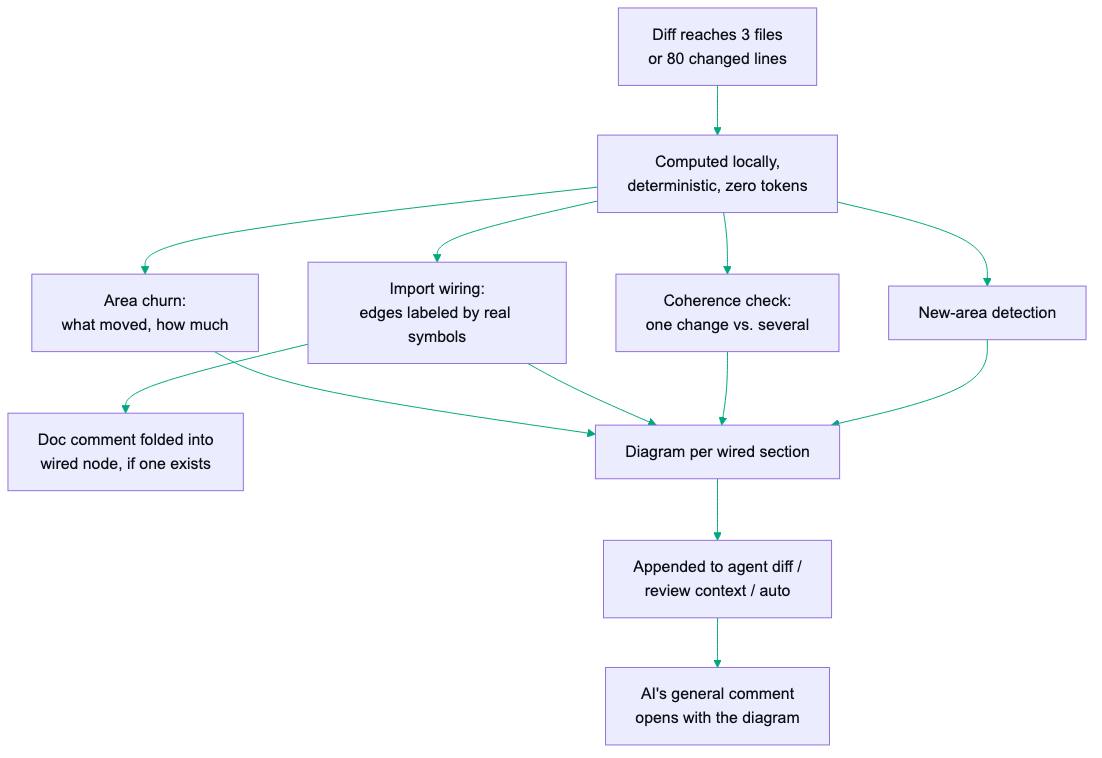
This is the biggest change to auto since this post was first written. Once a diff crosses a size threshold — 3 files or 80 changed lines, whichever comes first — agent diff, review context, and review run (and therefore every review pass auto triggers) append a BRANCHDIFF CHANGE MAP block ahead of the actual diff. It’s computed locally and deterministically, no AI tokens spent producing it: which areas of the codebase moved and by how much, which areas are wired together by imports, whether the PR reads as one coherent change or several unrelated ones stapled together, which areas are brand-new, and how many review passes the session has already been through.
The wiring analysis is the part worth dwelling on. It isn’t just “file A imports file B” — where the diff introduced a new symbol, the edge between two areas is labeled with the actual symbol name it added, and the box for the area being wired to folds in that symbol’s own doc comment when the diff added one. A matched symbol with no doc comment gets flagged as such, right there in the map — a small nudge toward documenting the thing you just wired half your diff into. Each wired section gets its own titled diagram, mermaid or ASCII depending on which the session’s remote renders. If the wiring analysis can’t run for some reason, the map degrades gracefully to just the churn table — it can never block a review from happening.
The result: the AI reviewer walks into every non-trivial diff with a map already drawn, instead of reconstructing “does this touch billing” from scratch by reading imports line by line. And that map doesn’t stay buried in the AI’s context — the general comment a review pass posts opens with a short intent summary followed by the change map’s pre-rendered diagram, copied as-is by default: mermaid on GitHub, ASCII on Bitbucket, one diagram per wired section on a PR that spans several unrelated areas. A human skimming the AI’s comment sees its model of the change before a single line-by-line finding.
The control surface that makes it safe to leave running
The default posture is read-only and local. auto runs the review, writes comments into your local session database, and stops there — nothing reaches the actual PR unless you pass --push. You can let it run against every open PR in a repo all week and the worst case is a pile of local drafts you never look at.
The second guard is about unattended specifically. Run auto from a cron job or a CI shell with no TTY, and it refuses outright unless --review was explicitly passed to skip the interactive PR-selection prompt. There is no code path where a headless process silently starts reviewing PRs because nobody was watching — you have to opt in on purpose, every time.
The same discipline applies to the commands that delete things. auto log delete, auto cron removeall, prune-worktrees cron removeall, clear, prune, and state reset all confirm with a (y/N) prompt first; --force skips it, and a non-interactive shell gets a refusal and exit 1 instead of a prompt that hangs forever. A cron-fired or scripted invocation can never destroy state by accident — it has to say --force out loud.
# fails on purpose in a non-interactive shell:
branchdiff auto --dest main

# explicit opt-in required for unattended runs:
branchdiff auto --dest main --review --push
Worth a pre-flight check before the first unattended cycle: branchdiff doctor verifies git, node, sqlite’s native binding, and the notification backend it detected on your OS — a broken binding should surface now, not at 2am on the first cron fire. --notify closes the loop without you tailing a log file — a desktop toast on start, on finish, on a comment push, on failure, each one carrying a link straight to the PR or the local session view. If nothing pops up, branchdiff doctor --notify fires a test toast against the backend it detected, so you can tell “not configured” apart from “configured but silently failing.”
There’s a third guard specific to skill mode. --skill and --resolve need the AI to run branchdiff agent commands headless — no human at the keyboard to click through a tool-permission prompt, which would otherwise block the run forever. So branchdiff auto-detects and appends the right unattended-approval flag for whichever tool it identified — via --tool <name>, or sniffed from a raw --exec command’s own first word — if that flag isn’t already there: --dangerously-skip-permissions for claude and antigravity, --yolo for gemini, --auto for opencode, --dangerously-bypass-approvals-and-sandbox for codex. It logs exactly what it added, so the command that actually ran is never a mystery. An unrecognized --exec is left exactly as written — branchdiff warns instead of guessing at a flag that command might not even support.
That flag is also the reason this section exists at all: letting a CLI run commands and edit files without prompting is real power to hand an unattended process. Before relying on this for reviews that matter, set up a deny-list — project-level and global/user-level permission settings for whichever tool you picked — the same way you’d sandbox any other automation that can execute arbitrary commands on your behalf.
The verdict gate: a rule the AI can’t talk itself around
Here is the part that actually matters if you are going to trust this thing enough to let it approve or block work. A SaaS reviewer that decides “looks good, approving” based on its own confidence is a liability the moment it is wrong and nobody can see why. auto’s verdict is not the AI’s opinion — it is a deterministic rule evaluated after the review pass, over the state of open threads.
--approve [level] and --request-changes [level] each take an optional strictness level, 1 through 5, default 1. Level 1 blocks approval on any open [must-fix] thread. Each step up widens what blocks it — level 2 also blocks on open [suggestion]s, up through level 5, which blocks on any open thread at all, tagged or not. And regardless of level: any thread a human started, tagged or not, blocks approval too — the tool never overrides a person’s open concern to hit a clean number. There is one deliberate exception: a bare acknowledgement — “LGTM”, “done”, “+1” — counts as a sign-off, not an open concern, so it does not hold the gate. The point of the gate is to catch unresolved issues, not to freeze on a comment that was already agreement.
| Level | Blocks approval on |
|---|---|
| 1 (default) | Any open [must-fix], or any human-started thread |
| 2 | Level 1 + open [suggestion] |
| 3 | Level 2 + open [nit] |
| 4 | Level 3 + open [question] |
| 5 | Any open thread at all, tagged or not |
branchdiff auto --dest main --review --approve 1 --request-changes 3 --pushBoth flags always write a verdict comment explaining the decision, but actually setting GitHub’s or Bitbucket’s review state additionally requires --push — without it, the reasoning stays local commentary and nothing on the remote PR changes. If you pass both --approve and --request-changes with different levels, auto refuses rather than guessing which one you meant. Before deciding, it reconciles threads from any earlier pass against the new diff — resolving its own prior findings, and resolving a human thread once that commenter has signed off on it; every other human thread it only replies to, never resolves, since closing someone else’s open discussion for them is still not the AI’s call to make.
Worth knowing before you lean on --push for real: if the comments post locally but the actual push to the PR fails — a rate limit, a network blip — auto retries only that publish step next cycle, not a full re-review. It doesn’t redo work it already finished; it just tries again to hand off what it already decided.
It tells you what it’s about to do before it does it
Every auto run prints a summary up front — two lists, Using: for every flag you actually passed, Defaults in effect: for everything you didn’t — before a single PR is touched.
branchdiff auto — this run
  Using:
    --tool claude  — AI command reviewing each PR
    --dest main  — only PRs whose dest branch matches
    --push  — pushes comments to the remote PR after each review
    --approve 1  — approves once nothing blocks
  Defaults in effect:
    --watch not set  — single pass, then exit
    --worktree not set  — reviews run in your actual working tree

  Full flag reference: branchdiff guide
That is a small thing on paper and a large thing at 2am — every line says not just which flag but what it does, so trusting what’s about to run doesn’t depend on remembering what --approve 1 means from memory.
Skip the noise: size gating
Not every diff deserves an AI pass. --max-files, --min-files, --max-lines, --min-lines compose together, are inclusive, and measure the whole PR against its base — so a 900-file dependency bump gets routed to a human instead of eating a review pass, and a one-line typo fix doesn’t either.
branchdiff auto --dest main --review --push --max-files 200 --max-lines 4000 --min-lines 5Every skip names exactly which bound rejected it and by how much, and it costs nothing — the size comes from the PR listing your forge already provided, or one local git diff when it doesn’t. A PR whose size can’t be determined is reviewed rather than silently dropped.
Running it unattended, for real
This is the actual “always-on bot” capability — the part that makes it fair to compare against a hosted service at all.
--detach forks auto into the background: the terminal returns immediately, output streams to a session-scoped log file, and the process survives closing your terminal or SSH session. It requires --review, for the same reason as before — a backgrounded process can never answer an interactive prompt.
Add --log and the run also records a timestamped, leveled log of everything it printed — its own output and every child’s — filed by date under ~/.branchdiff/auto-logs/<date>/<runId>/. It works in the foreground, under --detach, and inside cron schedules, and takes an optional size cap as its value (--log 5MB, anything from 100KB up) so a multi-day --watch run on a small disk keeps its head and tail and drops only the middle. Detached session logs get the same timestamps and cap even without --log.
branchdiff auto --dest main --review --push --tool claude --detachStarted detached auto session 3f2a9c21-...-b8e0 (pid 42117).
Log: ~/.branchdiff/auto-sessions/3f2a9c21-...-b8e0.log
branchdiff auto attach 3f2a9c21-...-b8e0 # follow it live (once available)branchdiff auto list shows every live detached session — id, repo(s), pid, mode, watch interval, log path (--json for scripts) — and prints one pointer to a run’s --log recording, not two. branchdiff auto attach <id> read-only tails the log (Ctrl-C stops watching, never the session itself). branchdiff auto stop <id> sends it the same signal a foreground Ctrl-C would. When a run was recorded, branchdiff auto log list groups the recordings under date headings, auto log view --id <runId> [--lines n] replays one (or tails a run that’s still live), and auto log delete removes by run id, by date, or everything — behind the (y/N) confirmation above.
The live echo you’re tailing got more useful too: during a tracked claude/opencode pass it now shows thinking and tool calls as they happen, not just the final reply — [thinking] ... and [tool] <name>: <headline arg> lines interleaved with the reply text, closer to what an interactive session actually shows. Worth knowing if you’re pairing --notify with attach to watch a run live rather than just get pinged at the end.
--detach still needs a human to type the command once, from a terminal that’s up. For “review PRs between 10am and 8pm on weekdays, on a box that’s just always on” — nobody attached, nothing typed each morning — branchdiff auto cron add writes real schedule entries instead — crontab on Linux, a launchd LaunchAgent on macOS (why that matters in a moment) — tagged so branchdiff only ever touches its own lines. --start/--end take the two cron expressions, and --review is required on the add itself, same rule as --detach: a schedule with no human ever around to answer the interactive prompt has to opt into unattended mode up front.
branchdiff auto cron add \
  --start "0 10 * * 1-5" --end "0 20 * * 1-5" \
  --dest main --tool claude --review --approve 1 --push --watch 30
One easy trap: cron add doesn’t add --watch for you. Without it, the 10am job fires once, reviews whatever’s open at that instant, and exits — it won’t keep catching new commits until the 8pm job stops it. Pass --watch <n> yourself if the point is covering the whole window, same as running auto by hand. Add --log to the schedule and every fired run is recorded under auto-logs/ like a detached one — cron add says so when it writes the schedule. Removing every schedule at once (auto cron removeall) asks for confirmation first, same as the other destructive commands.
branchdiff auto cron list a3f9c21b 0 10 * * 1-5 → 0 20 * * 1-5 [waiting]
auto --dest main --tool claude --review --approve 1 --push --watch 30
next start: in 14 hours (2026-08-05 10:00) last start: 3 days ago (2026-08-01 10:00)
next end: in 22 hours (2026-08-05 20:00) last end: 2 days ago (2026-08-01 20:00)Each schedule gets a random id (not a name you choose), and cron list shows both the raw auto args it’ll fire with and the next/last start and end times it computed from the cron expressions.
To stop or remove one: branchdiff auto stop --cron-id <id> stops a schedule’s currently-live session on demand — the end entry does the same thing automatically at its cron time, silently doing nothing if the session already ended on its own. branchdiff auto cron remove --id <id> is the permanent version — deletes the schedule from the crontab entirely, stopping any live session for it first. This is Unix-only (macOS and Linux) and needs no extra daemon — launchd on macOS, cron on Linux, whichever your OS already runs.
On macOS those entries are not crontab lines at all — they are a per-user launchd LaunchAgent, and that is not a preference but the fix for a silent failure. macOS TCC (the privacy layer behind Full Disk Access) quietly stops crontab from launching terminal tools, so a cron schedule installs cleanly and then never fires: no error, no log, nothing to grep. The bot simply stops reviewing, and weeks later someone notices. branchdiff detects macOS and writes a LaunchAgent — the same mechanism the OS uses for its own daemons, which TCC permits — while Linux keeps crontab. The command is identical on both: same --start/--end, same auto cron list showing which backend it used and when it next fires.
Isolation and cleanup
--worktree checks each PR out into its own .worktrees/ directory instead of switching your actual branch — your working tree never moves while auto reviews something else. Combined with --parallel <n> (which requires --worktree), several selected PRs review concurrently instead of one at a time, each in its own isolated checkout.
branchdiff auto --dest main --review --push --worktree --parallel 3--resolve adds an optional fix pass after the review pass: the AI reads whatever threads are still open in the session and fixes the code — local only, no commit, no push. You still inspect and commit the result yourself before it goes anywhere. And running auto twice in the same repo at once is refused by default rather than silently duplicating work; --force-session overrides that if you actually mean it.
Where to stay skeptical
A deterministic gate is only as good as your tags. --approve/--request-changes trust [must-fix] and the rest of the tag taxonomy to be applied correctly by whatever --tool you chose. A model that consistently under-tags real bugs as [nit] will happily approve things it shouldn’t — watch the first few weeks of output before raising the level or turning on --push unattended.
The change map is structural, not semantic. Import wiring, symbol names, doc-comment presence — all of that is a parse, not an understanding. It can tell you area A is now wired to area B via a specific new function; it cannot tell you whether that wiring is correct. Treat the diagram as orientation for the review, not as a verdict on the change.
--detach and cron mean it runs while you’re not looking. That is the whole point, but it also means a bad prompt or a misconfigured --exec command runs unattended too. When a review does fail, branchdiff tells you why by name — rate-limit, overload, billing, missing API key, timeout — rather than an opaque error, and --debug writes the full stack trace to per-run debug logs under ~/.branchdiff/logs/ (a different root from the auto-logs/ recordings --log keeps — debug traces versus the run’s own timestamped output). Start with --notify on and check branchdiff auto attach <id> regularly until you trust the setup.
Size gating is a proxy, not judgment. A 400-line PR that touches billing logic is riskier than a 4,000-line PR that’s entirely generated fixtures. --max-lines catches the obvious cases, not the subtle ones.
--resolve still needs a human pass. No commit, no push, by design — but read the diff it produces before you commit it. An AI that “fixes” a flagged issue by deleting the code around it is a known failure mode, not a hypothetical one.
This does not replace a human reviewer. It replaces the wait for one to notice the PR exists, and the ambient dread of not knowing what a black-box SaaS bot might do to your review state. The judgment calls — is this the right architecture, does this edge case matter in production — are still yours.
Quick start
Full install guide, changelog, and uninstall steps on the branchdiff releases page.
npm install -g @encryptioner/branchdiff
# or: pip install branchdiff
# or: brew tap encryptioner/branchdiff https://github.com/encryptioner/branchdiff-releases \
#          && brew install branchdiff

cd ~/work/your-repo
branchdiff auto --dest main                       # one-shot, interactive pick
branchdiff auto --dest main --review --push \
  --tool claude --approve 1 --detach              # unattended, backgrounded
branchdiff auto list                               # see what's running
branchdiff auto cron add --start "0 10 * * 1-5" --end "0 20 * * 1-5" \
  --dest main --tool claude --review --approve 1 --push --watch 30
You already pay for the trust problem a hosted bot creates. branchdiff auto moves the “reviews land automatically” outcome onto infrastructure you can read, a model you picked, and a verdict rule you can actually explain to your team.
Let’s Connect
I am always excited to hear what you are building. If this guide helped, or if you have questions about building self-review habits into your workflow:
- Website: encryptioner.github.io
- LinkedIn: Mir Mursalin Ankur
- GitHub: @Encryptioner
- X (Twitter): @AnkurMursalin
- Technical Writing: Nerddevs
- Support: SupportKori
branchdiff releases, install guide, and changelog: encryptioner.github.io/branchdiff-releases